> ## Documentation Index
> Fetch the complete documentation index at: https://klef.ai/docs/llms.txt
> Use this file to discover all available pages before exploring further.
# Adoption
export const Term = ({term, children}) => {
const terms = {
"desired-state": "What should be true for a worker: the accounts and access they should have, given who they are and their lifecycle stage.",
connector: "An integration with one of your systems.",
source: "An HRIS Klef pulls its workers from.",
target: "A connector Klef writes to.",
"worker-model": "Klef's own record of each worker.",
worker: "Klef's own record of one person.",
policy: "A rule that sets the desired state for a group of workers at each lifecycle stage.",
plan: "The set of operations needed to make reality match desired state, shown before it applies.",
operation: "A single change described in a plan.",
reconciler: "The engine that compares desired state to your live systems and produces a plan.",
resource: "A reusable piece a policy uses: a script, a lookup table, or a secret.",
segment: "A saved group of workers, defined by conditions over their attributes. A policy applies to one segment, or to everyone.",
"lifecycle-stage": "Where a worker is right now: Pre-start, Active, Leave, Suspended, or Terminated.",
mastering: "Taking a worker field's value from a connected system instead of your HRIS."
};
return {children};
};
Adoption is the act of matching a pre-existing target account with a worker synced from your HRIS. Klef never assumes ownership of an account automatically. A policy that would create an account for a worker who already has one stops and reports it on the plan instead of creating a duplicate.
Adopting accounts requires the [Member, Admin, or Owner](/docs/reference/roles-and-permissions) role.
## Connection Match Rules
Match rules are a set of rules dictating how a worker's accounts are matched to their target accounts. Each connection to a target system defines their own rules (e.g. a worker's employee ID matches Entra ID's `employeeId` attribute). By default, all target connections have their own match rules which can be modified.
## Adopting Accounts
Navigate to the **Connections** page from the sidebar.
For the desired target system, open its menu and click **Adopt accounts**.
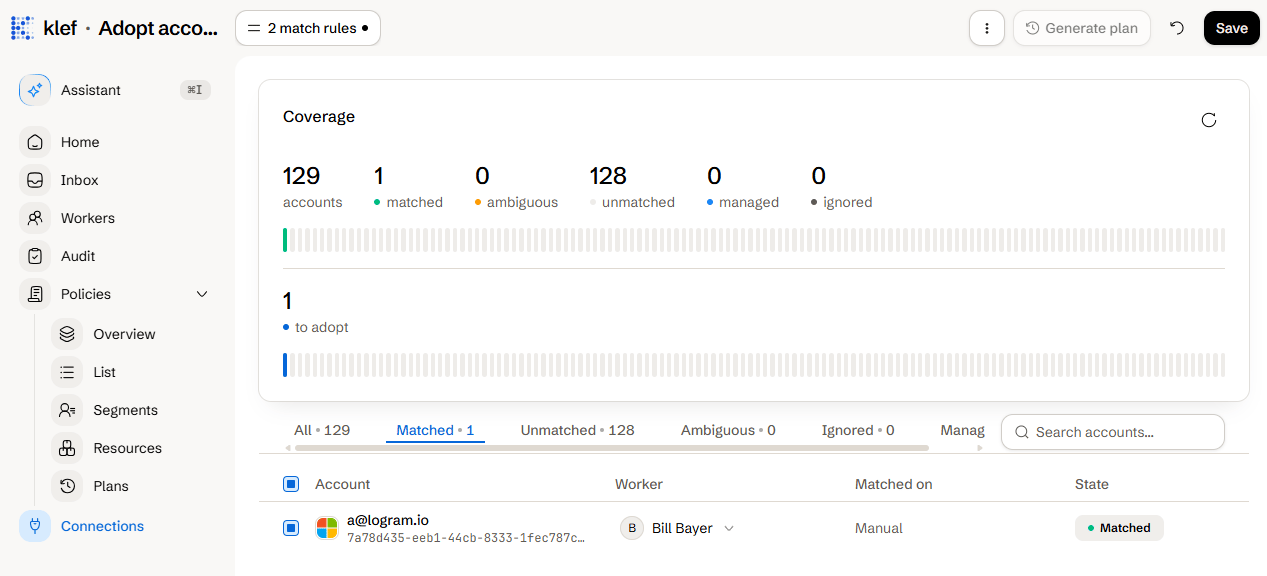
Review the match rules in the toolbar.
Rules are matched in the order in which they are defined.
If you've made any modifications to the match rules, click the **Save** button.
Open the **Matched** tab, and review the matched accounts. The **Matched on** column shows which rule paired each one. To pair an account with a different worker, change it in the **Worker** column.
Before proceeding, review the **Unmatched** and **Ambiguous** tabs as well.
Click **Generate plan** in the toolbar.
If the plan looks accurate, click **Approve**.
Adopting accounts is simply a pairing between the target system and a worker. By itself, it does not write to the target system.
After adoption, Klef treats the accounts as ordinary managed accounts. The next policy plan brings them to a desired state.
 ## Adoption Account States
| State | Meaning |
| --------- | ------------------------------------------------------------------------------ |
| Matched | A rule paired it with exactly one worker. |
| Ambiguous | A rule paired with multiple workers or a worker already has a managed account. |
| Unmatched | No rule found a worker for it. |
| Managed | Klef already manages it. |
| Ignored | You told Klef to leave it out of the review. |
## Ignoring and Detaching Accounts
* **Ignoring** an account to prevent it from showing up in future adoption reviews.
* **Detaching** an account undoes a previous match. It is a one-operation plan that drops Klef's record and leaves the account exactly as it is, with the option to ignore it at the same time so the review stops offering it.
What a plan holds and how it is approved.
Each connector's fields and match rules.
## Adoption Account States
| State | Meaning |
| --------- | ------------------------------------------------------------------------------ |
| Matched | A rule paired it with exactly one worker. |
| Ambiguous | A rule paired with multiple workers or a worker already has a managed account. |
| Unmatched | No rule found a worker for it. |
| Managed | Klef already manages it. |
| Ignored | You told Klef to leave it out of the review. |
## Ignoring and Detaching Accounts
* **Ignoring** an account to prevent it from showing up in future adoption reviews.
* **Detaching** an account undoes a previous match. It is a one-operation plan that drops Klef's record and leaves the account exactly as it is, with the option to ignore it at the same time so the review stops offering it.
What a plan holds and how it is approved.
Each connector's fields and match rules.