> ## Documentation Index
> Fetch the complete documentation index at: https://klef.ai/docs/llms.txt
> Use this file to discover all available pages before exploring further.
# Read the audit log
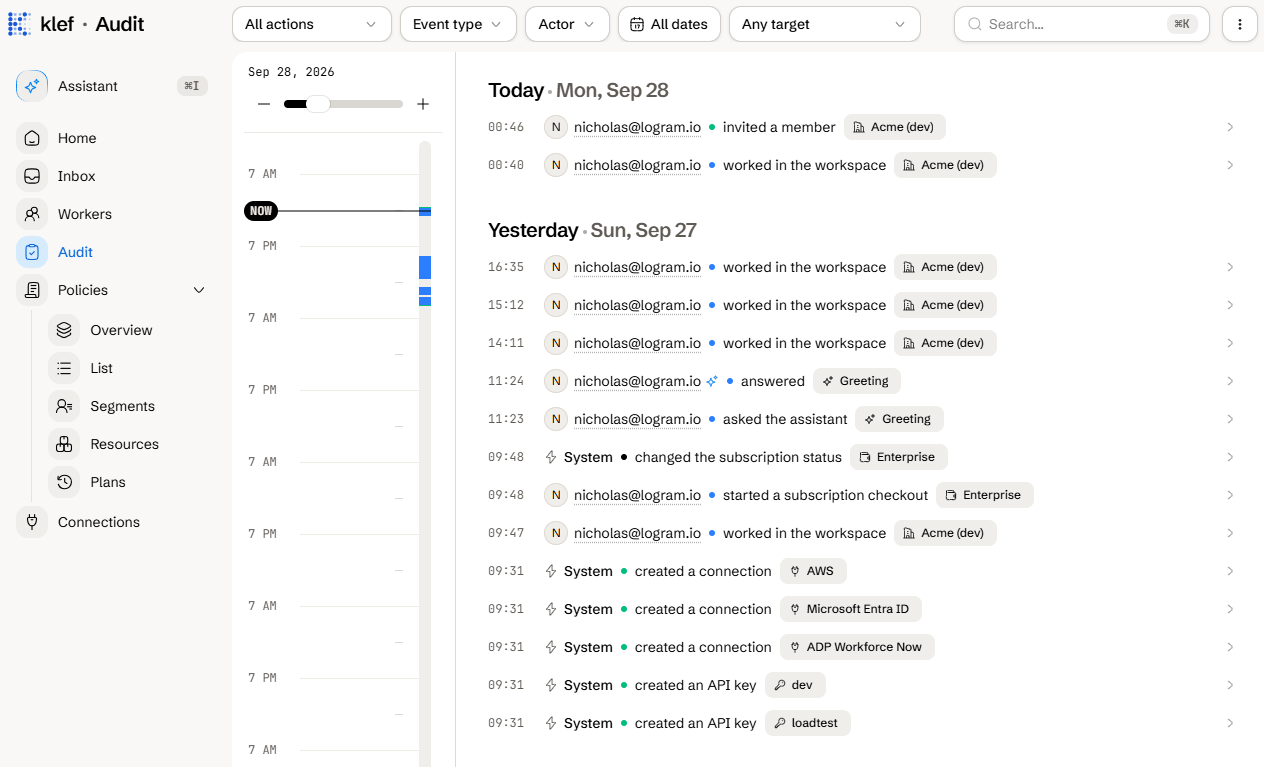
Reading the audit log requires the [View audit log](/docs/reference/roles-and-permissions) permission, which every role except Billing manager holds. Navigate to the **Audit** page from the sidebar.
 ## What Is Recorded
The audit log records any significant activities across your entire workspace, including user sign-ins, data exports, plan executions, and API key creation.
Every log entry contains:
* **Actor:** Who performed the action, with their IP address and user agent.
* **Action:** What they did.
* **Event type and target:** What was acted upon.
* **Time:** When it happened.
* **Trace ID:** A handle for support to troubleshoot issues.
### Actor Types
| Actor | Who it is |
| ------- | ------------------------------------------------------------------------ |
| User | A signed-in member. |
| Agent | The AI chat assistant, acting on behalf of a member. |
| API key | An API key, acting for the member who owns it. The record names the key. |
| System | Klef itself. |
| Support | Klef staff working in your workspace. |
## Filter the Log
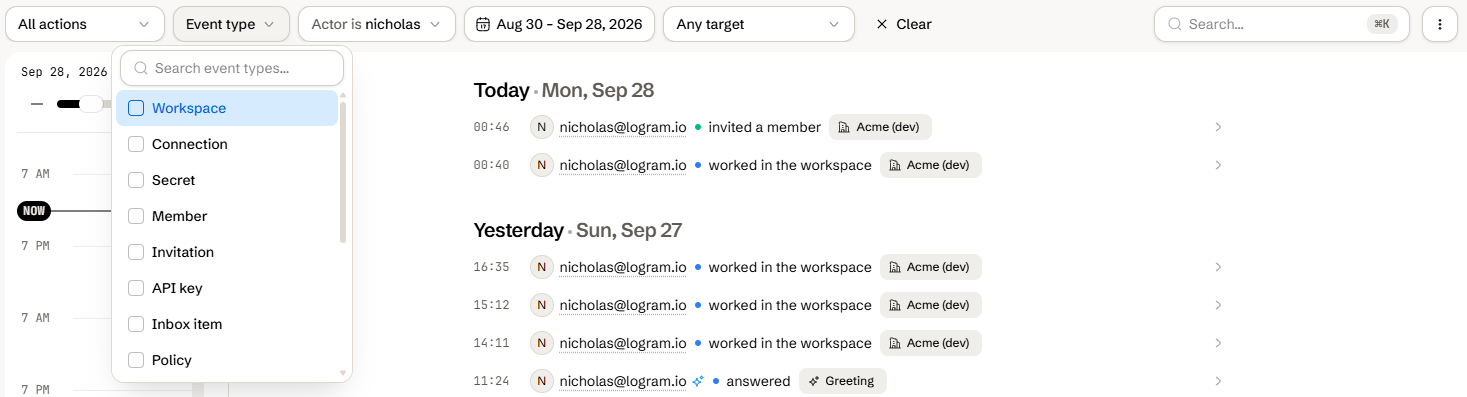
Use the toolbar to narrow the feed:
* **Action**: A single recorded activity. See [Actions](#actions) for a list.
* **Event type**: One or more kinds of target. See [Event types](#event-types) for a list.
* **Actor**: One or more members.
* **Date range**: A start and end date.
* **Target**: An affected entity such as a worker, connection, or the workspace itself.
To reset all filters, click the **Clear** button in the toolbar.
## What Is Recorded
The audit log records any significant activities across your entire workspace, including user sign-ins, data exports, plan executions, and API key creation.
Every log entry contains:
* **Actor:** Who performed the action, with their IP address and user agent.
* **Action:** What they did.
* **Event type and target:** What was acted upon.
* **Time:** When it happened.
* **Trace ID:** A handle for support to troubleshoot issues.
### Actor Types
| Actor | Who it is |
| ------- | ------------------------------------------------------------------------ |
| User | A signed-in member. |
| Agent | The AI chat assistant, acting on behalf of a member. |
| API key | An API key, acting for the member who owns it. The record names the key. |
| System | Klef itself. |
| Support | Klef staff working in your workspace. |
## Filter the Log
Use the toolbar to narrow the feed:
* **Action**: A single recorded activity. See [Actions](#actions) for a list.
* **Event type**: One or more kinds of target. See [Event types](#event-types) for a list.
* **Actor**: One or more members.
* **Date range**: A start and end date.
* **Target**: An affected entity such as a worker, connection, or the workspace itself.
To reset all filters, click the **Clear** button in the toolbar.
 ## Export the Log as a CSV
Navigate to the **Audit** page from the sidebar.
Click on the menu button in the top-right corner.
Click **Export**.
Choose a date range and click **Export**.
## Change How Long Records Are Kept
Records are kept for 2 years by default.
Navigate to **Settings > Workspace**.
Open **Audit log retention**.
Choose the new retention period, which spans from 30 days to 7 years, or **Forever** to keep records indefinitely.
Click **Save**.
Only the [Owner](/docs/reference/roles-and-permissions) role can change retention.
## Reference
### Event Types
| Event type | What it covers |
| -------------- | ----------------------------------------------- |
| Workspace | Workspace settings and onboarding |
| Member | Memberships and roles |
| Invitation | Invitations sent, resent, revoked, and accepted |
| Connection | Source and target connections |
| Secret | Workspace secrets |
| API key | API keys |
| Inbox item | Inbox items |
| Policy | Policies |
| Billing | The subscription and AI credits |
| Session | Sign-ins and sign-outs |
| Export | Worker and audit log exports |
| Target account | Accounts Klef manages in a target |
| Assistant | Assistant turns and tool runs |
| Worker | Worker records |
| Plan | Sync plans |
### Actions
The **Action** filter groups every activity the log records.
| Group | Actions |
| ------------------ | ---------------------------------------------------------------------------------------------------------------------------------------------------------------------------------------------------------------------- |
| Access | Workspace onboarded, Member invited, Member role changed, Member removed, Invitation revoked, Invitation resent, Invitation accepted |
| Workspace settings | Audit retention changed, Automatic applying changed |
| Authentication | Signed in, Signed out, Workspace accessed |
| Connections | Connection created, Connection updated, Connection deleted, Connection secret revealed |
| Secrets | Secret created, Secret updated, Secret deleted, Secret revealed |
| Inbox | Inbox item resolved, Inbox cleared |
| API keys | API key created, API key rotated, API key revoked |
| Policies | Policy created, Policy updated, Policy enabled, Policy disabled, Policy deleted |
| Billing | Subscription checkout started, Plan changed, Cancellation scheduled, Cancellation cleared, Subscription status changed, Credit checkout started, Credits purchased, Credits adjusted |
| Provisioning | Plan approved, Plan applied automatically, Account provisioned, Account updated, Link changed, Access changed, Claims changed, Managed items changed, Item ended, Account forgotten, Account adopted, Account detached |
| Exports | Workers exported, Audit log exported |
| Assistant | Assistant asked, Assistant answered, Assistant stopped, Assistant tool run, Change proposed, Change applied |
| Record access | Worker record viewed |
Which roles can view the audit log.
## Export the Log as a CSV
Navigate to the **Audit** page from the sidebar.
Click on the menu button in the top-right corner.
Click **Export**.
Choose a date range and click **Export**.
## Change How Long Records Are Kept
Records are kept for 2 years by default.
Navigate to **Settings > Workspace**.
Open **Audit log retention**.
Choose the new retention period, which spans from 30 days to 7 years, or **Forever** to keep records indefinitely.
Click **Save**.
Only the [Owner](/docs/reference/roles-and-permissions) role can change retention.
## Reference
### Event Types
| Event type | What it covers |
| -------------- | ----------------------------------------------- |
| Workspace | Workspace settings and onboarding |
| Member | Memberships and roles |
| Invitation | Invitations sent, resent, revoked, and accepted |
| Connection | Source and target connections |
| Secret | Workspace secrets |
| API key | API keys |
| Inbox item | Inbox items |
| Policy | Policies |
| Billing | The subscription and AI credits |
| Session | Sign-ins and sign-outs |
| Export | Worker and audit log exports |
| Target account | Accounts Klef manages in a target |
| Assistant | Assistant turns and tool runs |
| Worker | Worker records |
| Plan | Sync plans |
### Actions
The **Action** filter groups every activity the log records.
| Group | Actions |
| ------------------ | ---------------------------------------------------------------------------------------------------------------------------------------------------------------------------------------------------------------------- |
| Access | Workspace onboarded, Member invited, Member role changed, Member removed, Invitation revoked, Invitation resent, Invitation accepted |
| Workspace settings | Audit retention changed, Automatic applying changed |
| Authentication | Signed in, Signed out, Workspace accessed |
| Connections | Connection created, Connection updated, Connection deleted, Connection secret revealed |
| Secrets | Secret created, Secret updated, Secret deleted, Secret revealed |
| Inbox | Inbox item resolved, Inbox cleared |
| API keys | API key created, API key rotated, API key revoked |
| Policies | Policy created, Policy updated, Policy enabled, Policy disabled, Policy deleted |
| Billing | Subscription checkout started, Plan changed, Cancellation scheduled, Cancellation cleared, Subscription status changed, Credit checkout started, Credits purchased, Credits adjusted |
| Provisioning | Plan approved, Plan applied automatically, Account provisioned, Account updated, Link changed, Access changed, Claims changed, Managed items changed, Item ended, Account forgotten, Account adopted, Account detached |
| Exports | Workers exported, Audit log exported |
| Assistant | Assistant asked, Assistant answered, Assistant stopped, Assistant tool run, Change proposed, Change applied |
| Record access | Worker record viewed |
Which roles can view the audit log.