
Connection Match Rules
Match rules are a set of rules dictating how a worker’s accounts are matched to their target accounts. Each connection to a target system defines their own rules (e.g. a worker’s employee ID matches Entra ID’semployeeId attribute). By default, all target connections have their own match rules which can be modified.
Adopting Accounts
1
Navigate to the Connections page from the sidebar.
2
For the desired target system, open its menu and click Adopt accounts.
3
Review the match rules in the toolbar.Rules are matched in the order in which they are defined.
4
If you’ve made any modifications to the match rules, click the Save button.
5
Open the Matched tab, and review the matched accounts. The Matched on column shows which rule paired each one. To pair an account with a different worker, change it in the Worker column.Before proceeding, review the Unmatched and Ambiguous tabs as well.
6
Click Generate plan in the toolbar.
7
If the looks accurate, click Approve.
Adopting accounts is simply a pairing between the target system and a worker. By itself, it does not write to the target system.
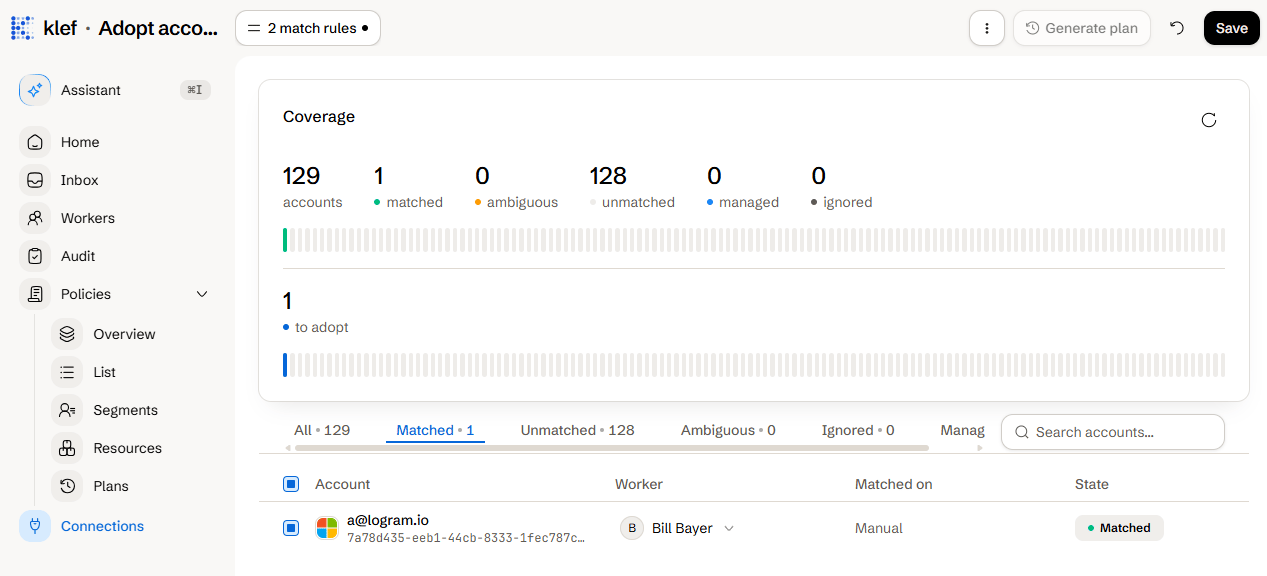
The adoption review for a connection
Adoption Account States
Ignoring and Detaching Accounts
- Ignoring an account to prevent it from showing up in future adoption reviews.
- Detaching an account undoes a previous match. It is a one-operation plan that drops Klef’s record and leaves the account exactly as it is, with the option to ignore it at the same time so the review stops offering it.
Plan
What a plan holds and how it is approved.
Connectors
Each connector’s fields and match rules.